
- ACADLIX MOBILE EXPERIENCE
Turn Your WordPress LMS Into a Mobile App with ease
Give students a mobile-first learning experience without building a separate native app.
PWA, SPA navigation, mobile dashboards, custom menus, and more—all built into Acadlix. through an experience designed to feel like an app.
- NO SEPARATE APP DEVELOPMENT
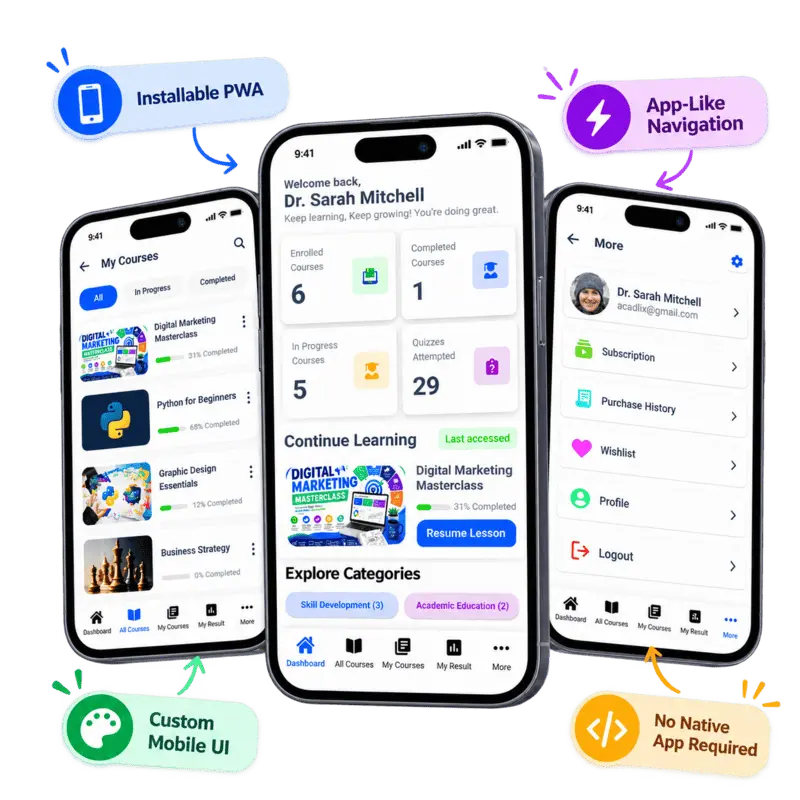
Give Students an App-Like Experience Without Building an App
Acadlix brings the mobile experience directly into your WordPress LMS. Give students a dedicated, app-like interface for learning—without developing and maintaining a separate native application.
📱 App-Like Learning
Give students a mobile experience designed specifically for learning.
⚡ Smooth Navigation
SPA-based internal pages provide faster, app-like navigation without unnecessary page reloads.
🎨 Your Brand, Your Experience
Customize the mobile login, splash screen, menus, dashboard, header, footer, and more.
📲 Installable PWA
Students can install your LMS directly on their device and access it like an app.
- BUILT FOR MOBILE LEARNING
Everything Students Need, Right at Their Fingertips
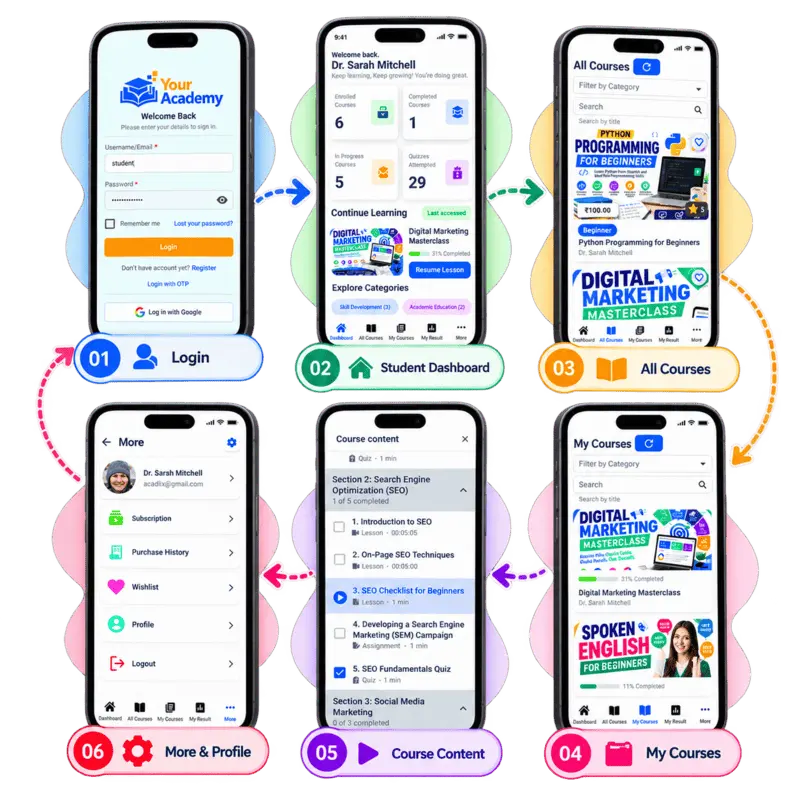
Acadlix transforms your WordPress LMS into a streamlined mobile learning experience where students can navigate courses, quizzes, results, live classes, and more without leaving the app-like interface.
📚 Course Access
Browse courses, continue lessons, and track learning progress from one place.
🧩 Quizzes & Results
Take quizzes and access results through the same streamlined experience.
🎓 Student Dashboard
Show relevant courses, progress, categories, and other dashboard widgets your students need.
🧭 App-Like Navigation
Use bottom navigation and the More menu to give students quick access to important areas.
- YOUR BRAND. YOUR EXPERIENCE.
Customize the Mobile Experience Your Way
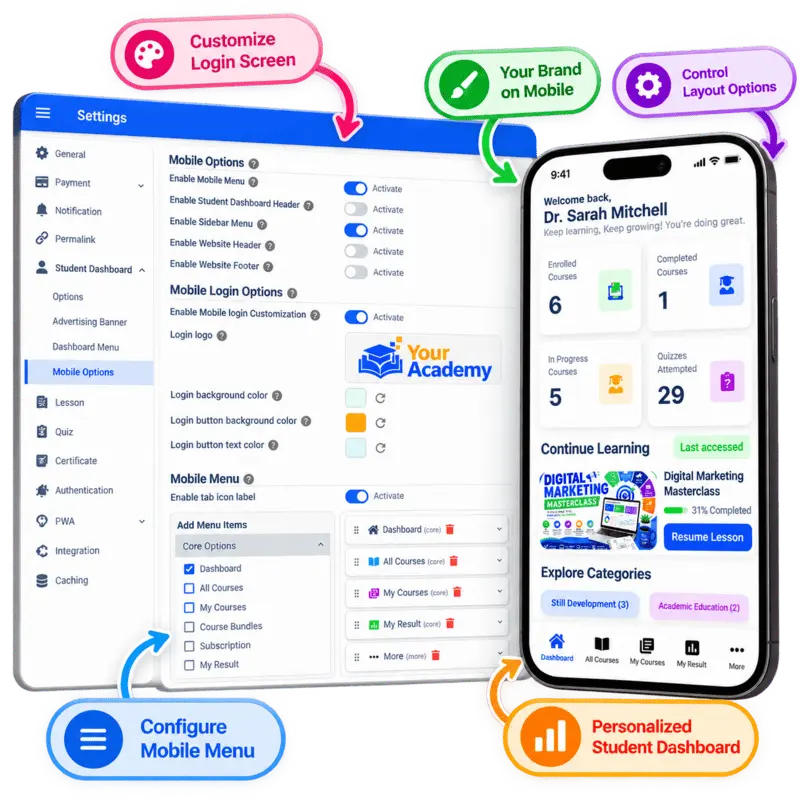
Make the Acadlix mobile experience feel like your own platform. Customize the screens, navigation, branding, and student dashboard to match your learning website.
🎨 Branded Login Experience
Customize the mobile login screen with your logo, background, button colors, and more.
📱 Custom Splash Screen
Give students a branded experience from the moment they launch your PWA.
🧭 Flexible Navigation
Control the bottom navigation, sidebar, header, and app-style More menu.
📊 Personalized Dashboard
Choose and organize the widgets and information students see on their dashboard.
- INSTALLABLE PWA
Make Your LMS Installable App
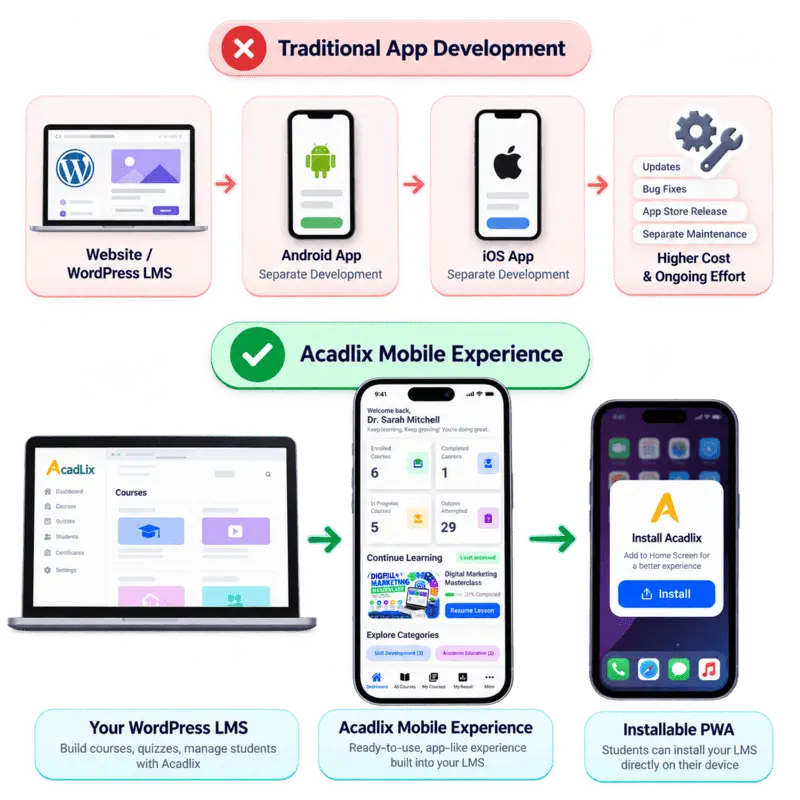
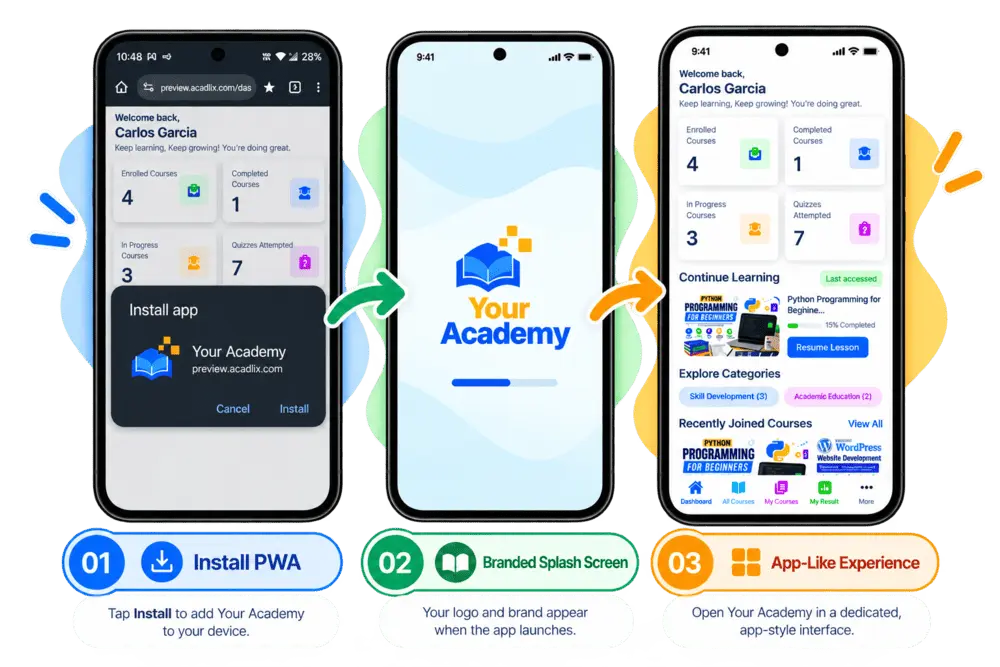
Acadlix turns your mobile learning experience into an installable Progressive Web App (PWA), giving students quick access to your LMS directly from their devices—without requiring a separate native app.
📲 Install From the LMS
Students can be prompted to install the PWA directly from their student dashboard.
⚡ Mobile App Experience
Once installed, your LMS can open in a dedicated, app-style interface instead of feeling like a traditional website.
🔄 Service Worker & Caching
Acadlix uses service workers and caching to support a smoother and more reliable mobile experience.
🎨 Your Branding, Your App Experience
Use your own branding, splash screen, login experience, navigation, and student dashboard.
Want an Android APK?
Package your Acadlix PWA as an Android app using tools such as PWABuilder, giving you another way to distribute your LMS as an app.
- SMARTER WAY TO GO MOBILE
Give Students an App Experience Without the Native App Development Hassle
Building and maintaining separate Android and iOS apps takes additional time, budget, and technical resources. Acadlix brings an installable, app-like mobile experience directly to your WordPress LMS—so you can focus on delivering great learning experiences instead of managing a separate app project.
🛠️ Reduce Development Complexity
Avoid starting a separate native mobile app project just to give students an app-like LMS experience.
📚 Keep Learning in One Platform
Courses, lessons, quizzes, assignments, and student progress remain part of your Acadlix-powered LMS.
⚙️Simplify Ongoing Maintenance
Manage the mobile learning experience through your existing WordPress and Acadlix setup instead of maintaining an entirely separate app codebase.
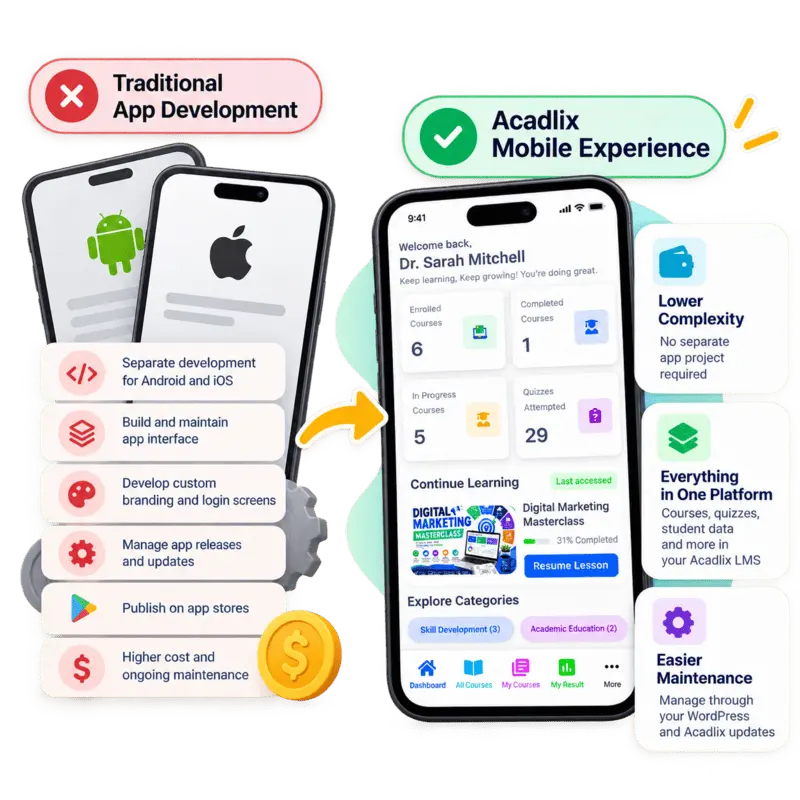
Acadlix Mobile Experience vs. Native App Development
| Feature | Traditional App Development | Acadlix Mobile Experience |
| Mobile learning interface | Requires separate app development | Built into Acadlix |
| Android and iOS access | Separate platform builds may be required | Access through supported mobile browsers and installable PWA |
| App-like navigation | Requires custom implementation | Built-in SPA navigation and customizable menus |
| Branding and login screen | Requires custom UI development | Customizable mobile login and branding options |
| Course and quiz integration | Requires LMS integration and maintenance | Integrated with your Acadlix LMS |
| Student dashboard | Requires separate app UI implementation | Mobile dashboard with customizable layout and menus |
| Updates and maintenance | Manage app code, compatibility, and releases | Manage your WordPress LMS and Acadlix updates |
| Installation | App-store distribution or other deployment methods | Installable directly from supported browsers |
| Android APK | Requires an Android build and packaging process | Can be packaged using a tool such as PWABuilder |
| Development effort | Separate mobile development project | No separate native app development required |
| App Store Commissions | Upto 30% per sale | Zero Commission |
- FREQUENTLY ASKED QUESTIONS
Everything You Need to Know About Acadlix Mobile Experience
Find answers to common questions about mobile experience, bottom navigation, PWA, login page customization, apk creation and set.
Can I turn my WordPress LMS into a mobile app without developing a native app?
Yes. Acadlix provides a Progressive Web App (PWA) and an app-like mobile experience within your WordPress LMS. Students can install the PWA on supported devices and access their learning platform through an app-style interface without requiring a separately developed native Android or iOS app.
What is a PWA, and how does Acadlix use it?
A Progressive Web App (PWA) is a web application that can be installed on supported devices and launched in an app-like window. Acadlix uses PWA technology to make your LMS installable, with support for service workers, caching, and a customizable mobile experience.
Can students install Acadlix directly on their phones?
Yes. Students can be prompted to install the PWA from the Acadlix student dashboard. Depending on their browser and device, they can install it or add it to their home screen for convenient access.
Can I create an Android APK from my Acadlix PWA?
Yes. You can use a tool such as PWABuilder to package a compatible Acadlix PWA into an Android application package (APK). The packaging process and distribution requirements depend on your PWA configuration and the target platform.
Does Acadlix provide a separate mobile dashboard for students?
Acadlix provides an app-like student experience with a dedicated dashboard and internal pages. Administrators can configure the student experience and customize supported interface elements, including navigation, headers, sidebars, and dashboard widgets.
Can I customize the mobile app experience with my own branding?
Yes. Acadlix supports mobile interface customization, including the login logo, background and button colors, splash screen, navigation menus, and supported dashboard layout options. This helps you create a mobile learning experience that matches your brand.
What is SPA navigation, and how does it improve the Acadlix mobile experience?
Single-page application (SPA) navigation allows supported internal pages to load without a full browser page reload for every navigation action. Acadlix uses SPA-based student pages to provide a smoother, more app-like experience when navigating supported areas of the LMS.
Does Acadlix support bottom navigation and an app-style More menu?
Yes. Acadlix supports customizable bottom navigation and a More menu for accessing student dashboard pages. Administrators can configure menu items and add other WordPress pages to the student dashboard, making important learning features and custom pages easier for students to access on mobile devices.
Does the Acadlix PWA work offline?
Acadlix improves the offline experience by notifying students when their internet connection is lost. If a student loses connectivity while attempting a quiz, the quiz interface can remain open, and they can review the answer sheet of an attempted quiz. However, features that require live API requests or dynamic data may not work until the connection is restored. Acadlix also displays an offline page when users try to access pages that are unavailable offline.
Is Acadlix's mobile experience better than building a separate native app?
Acadlix offers an app-like learning experience without the cost and complexity of developing a separate native app. Sell courses, quizzes, and subscriptions directly through your WordPress LMS, without relying on app-store billing for those web-based transactions. Native apps selling digital courses may face 15–30% store commissions, depending on the platform, region, and applicable program.
What kind of support does Acadlix provide?
Acadlix provides documentation, product updates, video tutorials, and dedicated support to help users set up and manage their online exam platforms smoothly.
You can contact us via email at contact@acadlix.com or via Call/WhatsApp at +91-8755077650.
I have a few pre purchase question!
Let’s connect to our, and we will be happy to answer your questions. Even if you need a demo from our team, you can let us know.
You can contact us via email at contact@acadlix.com or via Call/WhatsApp at +91-8755077650.
Ready to Build Your Learning Platform?
Whether you’re exploring, comparing, or ready to start, Acadlix gives you everything you need to create professional online courses, quizzes, and competitive exams on WordPress.