 13Jun
13Jun

Are you planning to create a competitive exam website like Testbook, Adda247, Oliveboard, Guidely, Gradeup, Practicemock, etc. on WordPress? Then this article will be very helpful for you to build it without writing any code.
Is it possible to create a competitive exam website like Testbook, Adda247, Oliveboard, Guidely, etc. on WordPress
The first thing that may come to your mind is whether it is possible with WordPress to develop a full-featured competitive exam platform for various exams like IBPS, SBI, SSC, UPSC, JEE, NEET, Railway, TET, CSIR NET, CAT, GATE, MAT, State Level exams, etc. And the answer to this question is Yes; you can easily build a full-featured website using WordPress and can sell your test series, courses, etc.
We’ve been building WordPress-based eLearning solutions since 2013 and have worked with coaching institutes, schools, universities, and training organizations. This guide is based on our practical experience rather than theory.
Who is this guide for?
This guide is especially for those who want to know how they can build a full-featured e-Learning or mock test portal on WordPress
- Coaching institutes
- Schools
- Website Developer
- Hobbyist
- Individual educators
- EdTech startups
Common core features of famous Mock Test Websites
I would like to discuss the most common core features of all these websites that are:
- Indian competitive exams-like layout
- Detailed mock test analytics
- TCS / NTA exam-like features
- Robust Subscription system
- Easy student onboarding with social login or OTP based login
- Responsive Design
These are the common but essential features for any competitive exam website or mock test portal.
WordPress Vs Custom Mock Test Portal
| Requirement | WordPress | Custom Development |
| Initial Cost | Low | High |
| Time to Launch | Days | Months |
| Maintenance | Easy | Complex |
| Scalability | High | High |
| New Features | Yes via Plugins | No- require proper development |
| Coding Required | No | Yes |
Should I copy the same design for my mock test portal?
Another question that needs to think carefully is: do you need to copy the same design of these famous mock test websites?
And the answer is a big NO. The reason behind this No is that when you are building your competitive exam website from scratch, you must think about your users, their preferences, and the exam that you are focused on.
Popular exam portals already have thousands of tests and lakhs of questions, so don’t try to compete with them in terms of data. You just pick the best and most useful part from their website and try to implement it on yours.
For example, most of these websites have a header with a mega menu that has 100s of sub-menu items for different courses, but if you are focused on 5-10 exams, then you don’t need such a heavy mega menu for your site. The same applies to the footer and homepages.
What you should focus on
- Mock tests features
- Online Courses
- Live Classes (if you are planning to provide)
- Subscriptions
- Course Bundle
- Indian Payment Gateway Integration
- Offline Payment Support
- Manual enrollment
- OTP based Login
- Social Login
- Detailed test analytics
- Detailed course analytics
- AI-based assistance
- Drip Content to schedule content
- Concurrent login limitation
- Security features
- Lightweight setup
And on your Content – Because content is King!
Which plugins are required to create a mock test website on WordPress?
To create a fully featured mock test or online test series website, you will need the following plugins
- LMS that supports the Indian Competitive Exams Mock Test – AcadLix LMS Pro
- Page Builder – Elementor
- SEO Plugin – RankMath, All in One SEO, Yoast, etc.
- Cache Plugin – LiteSpeed Cache, W3Total Cache, WP Rocket, etc.
- SMTP Plugin – Fluent SMTP, WP Mail SMTP, etc.
- Any other plugin based on your requirement.
How will these plugins help you to build a premium online mock test website?
First of all, you need a WordPress LMS plugin focused on Indian competitive exams, and that is Acadlix LMS.
You can build a full-featured competitive exam website on WordPress using the Acadlix LMS plugin that is specifically designed with the approach of an Exam-first WordPress LMS plugin. It provides you with the various must-have features for Indian competitive exams like
- 10 Question types ( Single choice, Multi-choice, Fill in the blank, Free choice, Sorting choice, matrix sorting choice, True / False, Numerical, Range Type, and Assessment or Essay type)
- Negative marking and Fractional marking
- Full exam or subject-wise / sectional or per question timing
- Optional questions
- Exam-like layout and features
- Mark for review
- Clear answer
- Save and next
- Question palette with exactly the same color status
- Multiple exam layouts
- Automatic submission of the exam once time has elapsed
- Secured exam interface
- Mobile-first design.
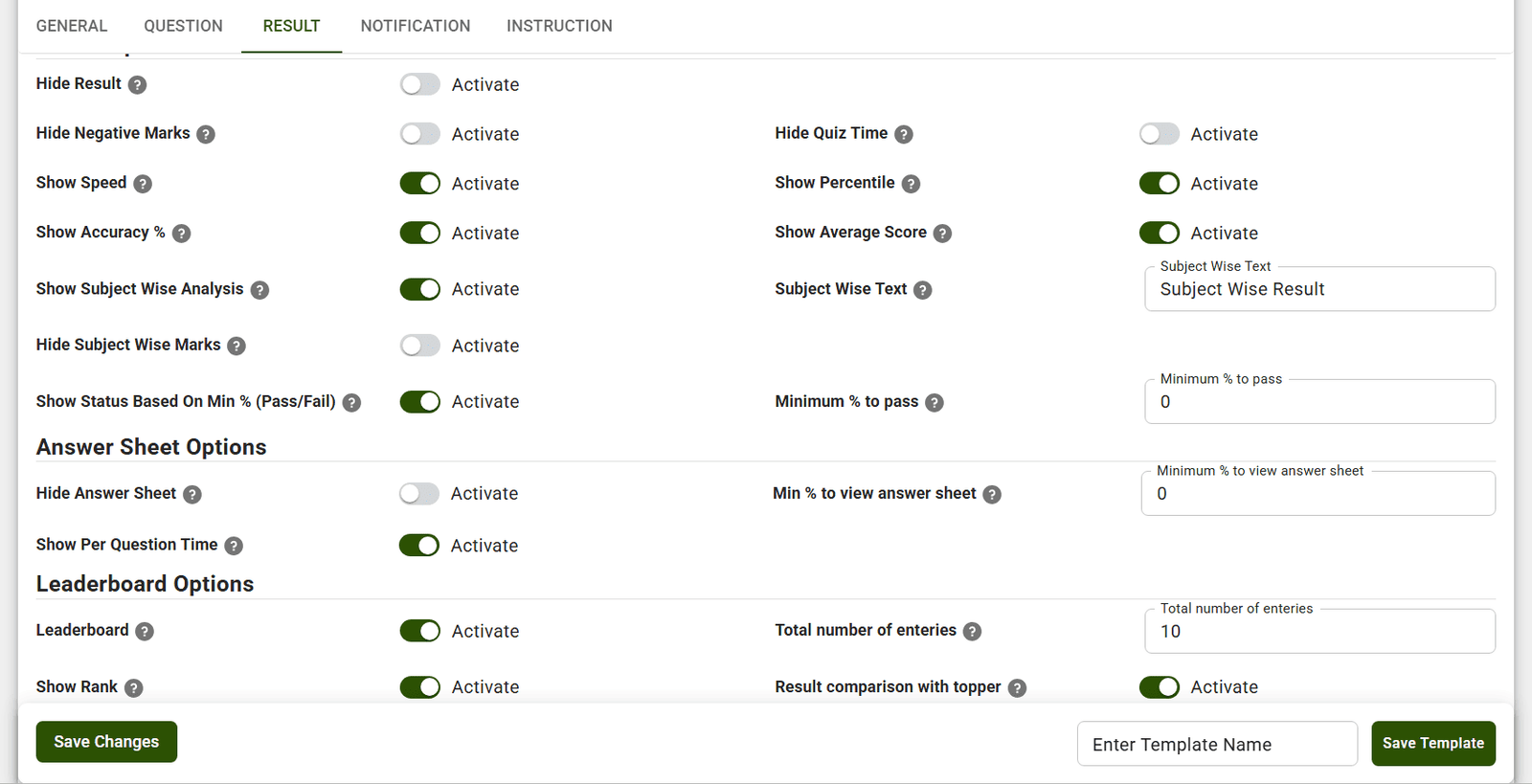
- Configurable Quiz features per quiz.
Apart from this, to ease your management, it provides the
- Bulk Word question import
- Bulk subject, marks, and difficulty level assignment
- Quiz Templates for faster exam creations
- Question Creation and Validation using AI
- Reusable quizzes and copy questions from other quizzes features.
- Upload students from an MS Excel file
- Admin can assign courses in bulk
When it comes to selling your test series or courses, it provides you with the industry’s best
Subscription system with auto and manual payment options, which means you can use any payment gateway for the subscriptions also. Apart from this, you can sell your courses with one-time pricing or can sell multiple courses as a bundle. Acadlix course bundle will help you to sell more courses at discounted prices, so that aspirants can enroll in more than one courses same like Guidely provides it.
Built-in RazorPay, PayU, and an offline payment gateway to accept payments.
Another Plugin you need is Elementor – It will help you with the designing part of your website. With Elementor, you can design your website’s home page, course page, header, footer, etc. as per your requirements. That’s why I said you don’t need to copy the design; just choose the sections that fit best for you and design them using Elementor. If you need highly customizable features, then you can use Elementor Pro or Elementor Free with the Pro Elements Plugin.
To speed up your website and reduce the load on your hosting, you need caching plugins. We recommend choosing the caching plugin based on your host; for example, Hostinger recommends Lightspeed cache for their hosting as they are using the OpenLiteSpeed servers.
Use an SMTP plugin that will help you to send the email properly. Along with that, I recommend using an email provider like Zoho, Google, etc., so that you get proper transactional emails that land in the inbox of your users, not in the Spam or promotional folders.
SEO plugins will help you to get organic visitors from the various search engines, so choose one that fits your needs by comparing them.
How to create a competitive exam website on WordPress
I am discussing here from zero to the final website, so that you can know each step:
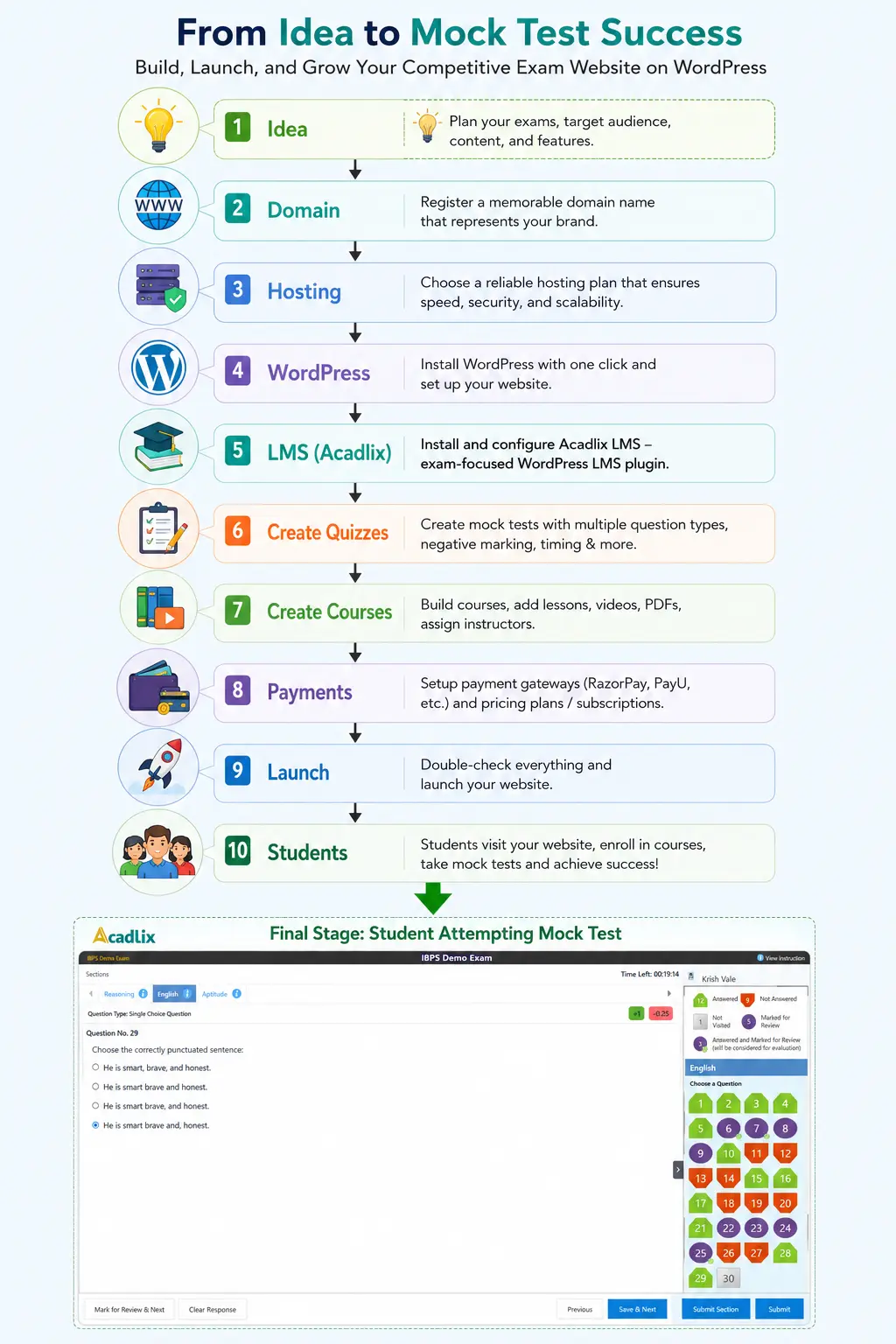
Register a domain name
The first step is getting a domain or website name so that your learners can visit your mock test portal. I recommend choosing an easy domain name for your website that your visitors or learners can easily remember.
Avoid very long names, similar names to existing portals, names with hyphens, unpopular domain extensions or TLDs. Prefer .com or .in
Note: Most hosting plans come with one year of free domain registration when you purchase hosting for one or more years.
Get a good hosting
Hosting is your rented space where your website’s files and other data will get stored. Getting good hosting is a must based on your requirements. Here, requirements means, if you are already a well-settled coaching institute and already have hundreds of students, then you should go for VPS hosting. If you are a newbie or have a very low budget, then you can start with a shared hosting plan; later you can upgrade it when required. But while selecting a hosting company or plan, you must check
- Space
- Bandwidth
- RAM
- Inode usage
- Location
- Latency
- Availability
- Support
- Price
- Cache
- Staging site support
- Backup and Restore
- Security
What we recommend?
If you are planning for a small to mid-size eLearning portal
If you are planning for a high-availability website
- Kinsta
- AWS
- Google Cloud
- Pressable
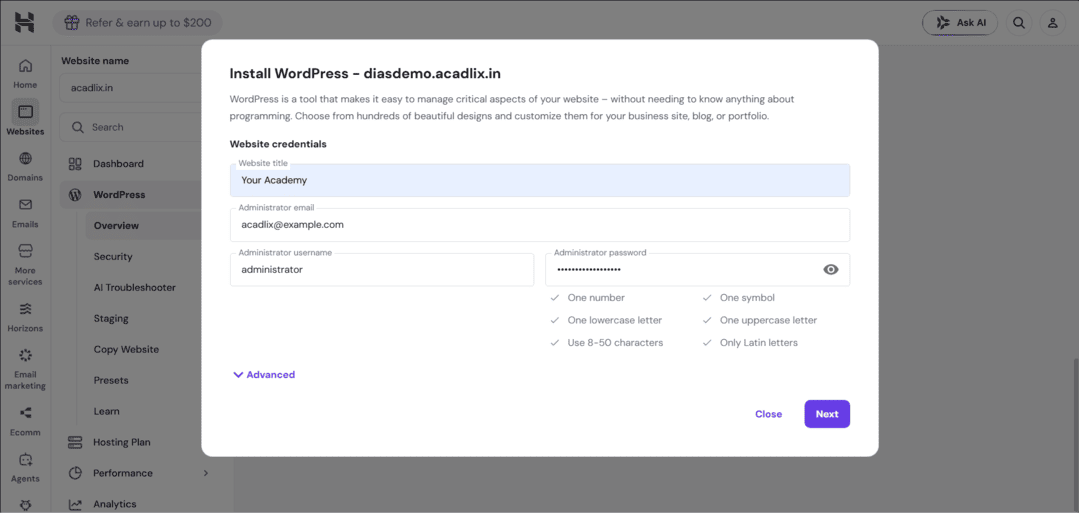
Install WordPress
After getting your domain and hosting, install WordPress on your website. Hostinger and Kinsta both provide a tool that will install WordPress on your domain within a few clicks.
Install the required plugins
Once you install WordPress, log in to your WordPress admin dashboard and start installing the required plugins. You will get all the free plugins from the WordPress plugin repo; for that, you can navigate to your admin dashboard à Plugins à Add à Search for plugins à Install à Activate à Complete basic setup.
To get premium plugins like Acadlix Pro, you must buy a license key.
Note: There is a Free version of Acadlix that is also available on the WordPress plugin repo. You can install it to learn more about the core features.
Configure the LMS Plugin
Acadlix LMS Pro is a full suite of required features for your mock test portal, so it needs a few configurations before jumping to the mock test creation.
After installing the plugin, it is recommended that you configure the General settings, Payment Gateway settings, Social and OTP based login, Concurrent login limit, Notification settings, and various integrations based on your requirements, for example, OpenAI for AI-related features, Zoom / GMeet / Microsoft Teams for Live classes, SMS Gateway Integration for SMS OTP based Login, etc.
1. Create Your First Quiz
Once you complete the basic setup, create at least 4-10 quizzes to explore all the features and modes of the LMS. As this LMS plugin has several configurable quiz features, 10 question types, and Four Quiz modes, we recommend you try these based on your requirements to choose which one is best for your needs.
2. Create your First Course
Once you add your quizzes, let’s navigate to create a course. Courses will help you to sell the quizzes as test series. In the courses, you can also add text, video, audio, PDF based lessons. Using shortcode, you can also embed other types of files into the lessons.
If you are also planning to provide live classes, then Acadlix Pro provides the option to add live classes using Zoom / GMeet / MS Teams.
If your coaching is for school or UPSC-related exams, then you can also add homework or assignments within the course, so that students can submit a written answer or file-based response.
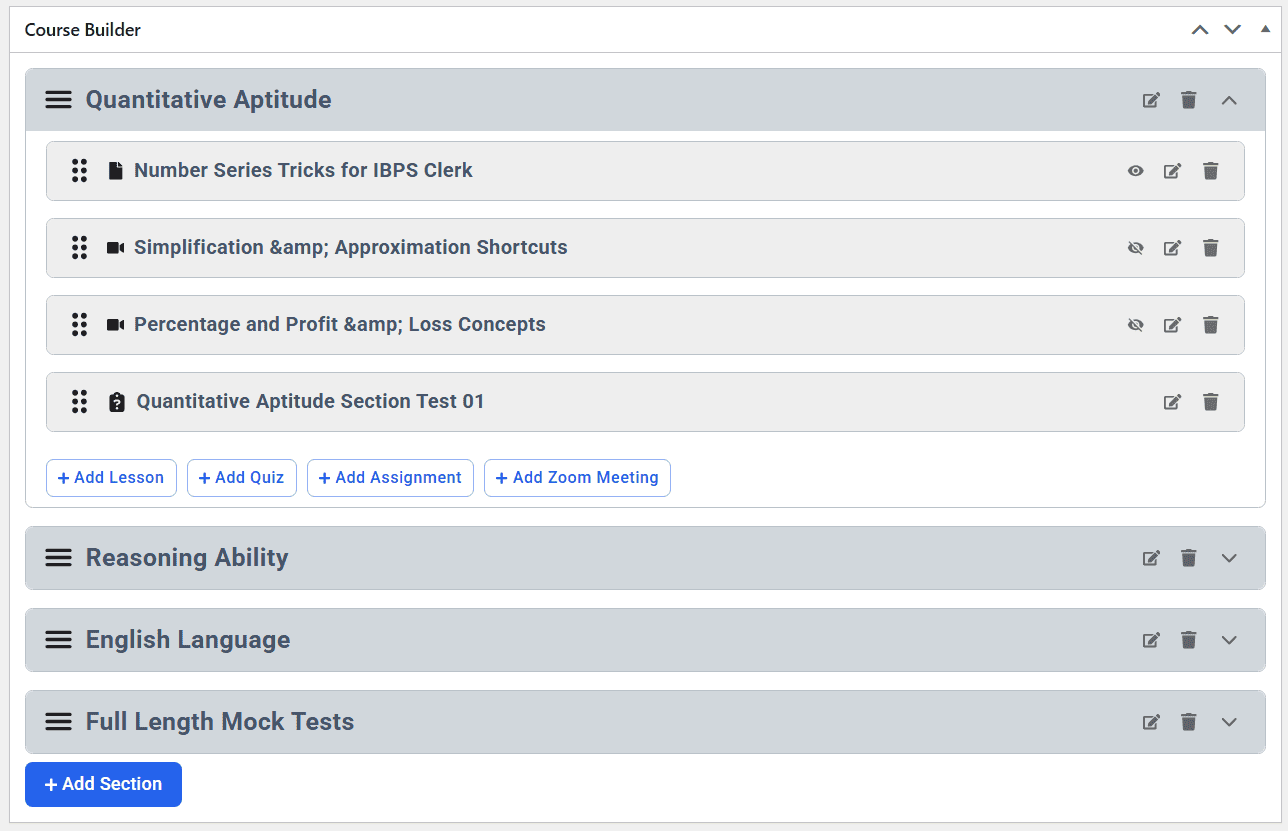
Create Builder in Acadlix
3. Set Price (One-time or subscription-based or both)
Once your course curriculum is ready, set the Payment details for your course. You can set it for free, a one-time purchase or recurring subscription, or a one-time + Subscription both. Here again, your LMS allows you the freedom to provide various selling options via it’s native eCommerce.
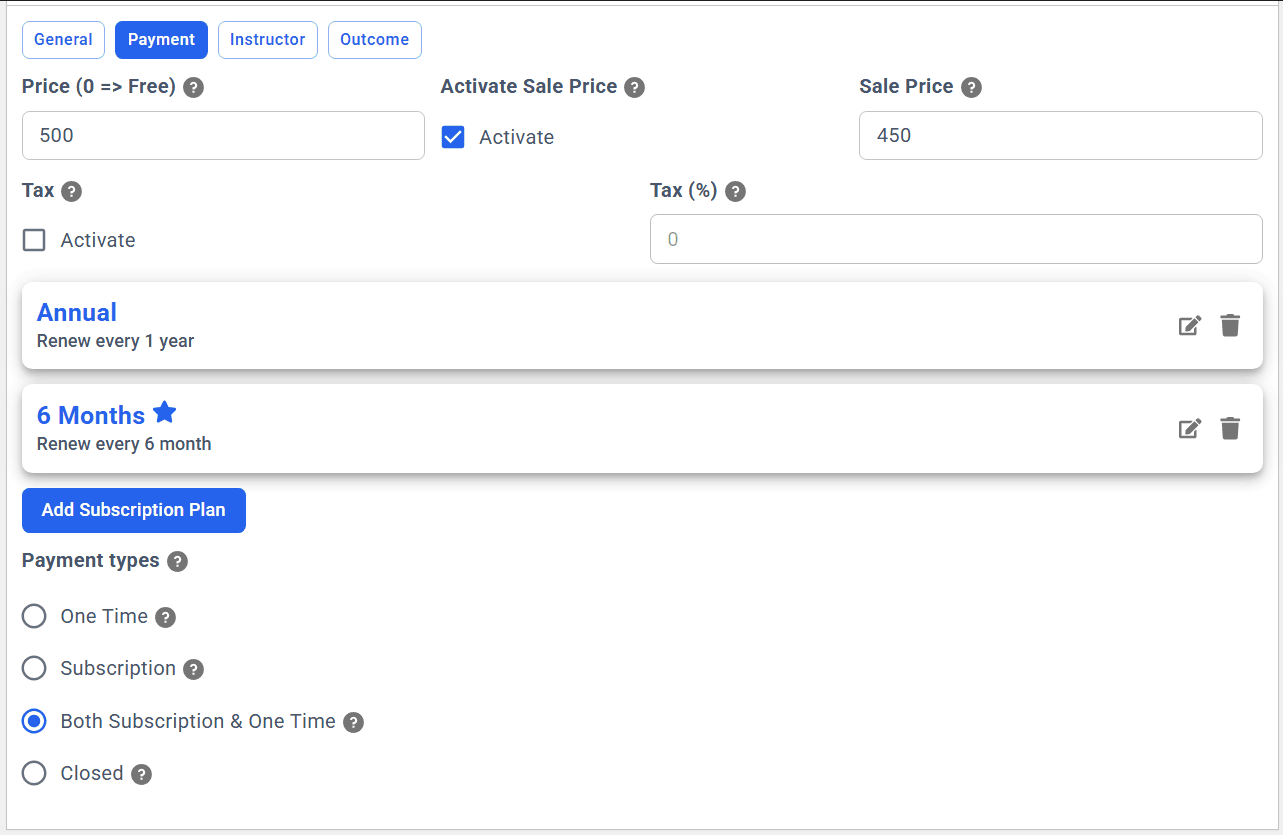
Manage Payment in Acadlix
4. Publish the Course
Once everything is ready, publish your course for the students, and students can purchase it directly from your website.
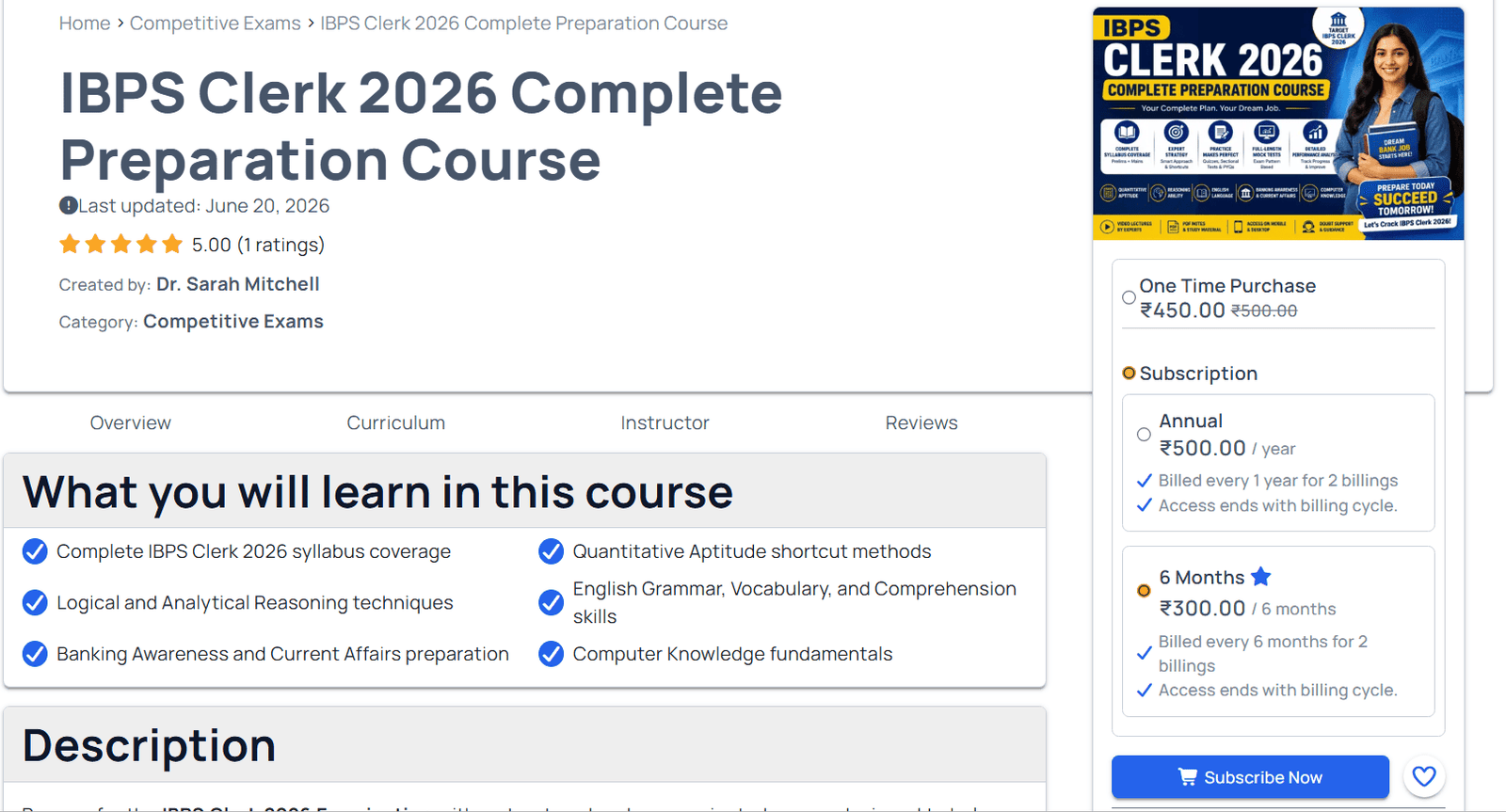
5. Monitor the various Analytics and Performance
Acadlix LMS provides you with various student-level and course-level analytics that are necessary for your eLearning portal. View student progress, check the quiz analytics, answer sheets of students, Order history, etc., and build your strategy to grow.
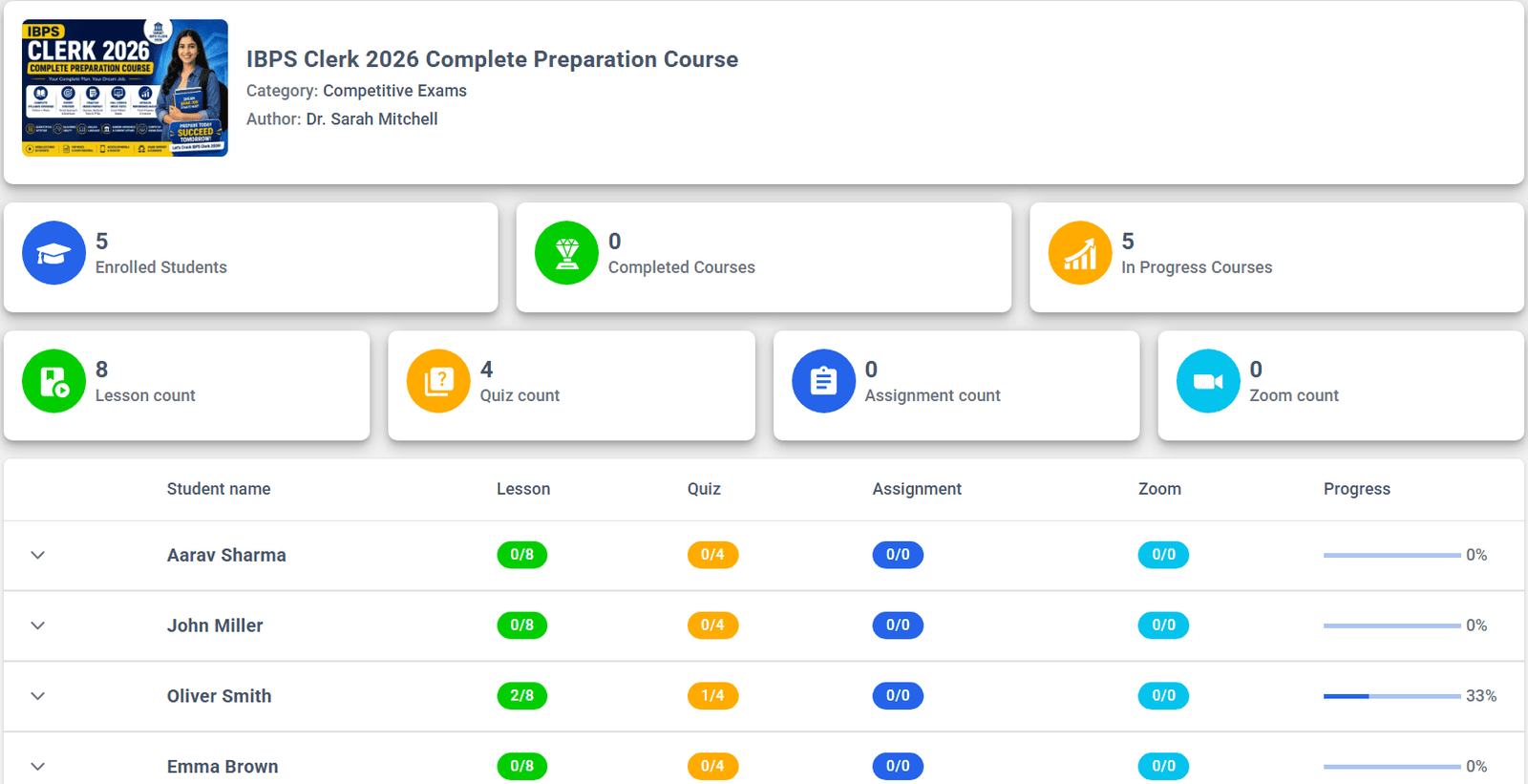
Design your Home Page and Pages
I have recommended the Elementor Pro or Elementor Free + Pro Elements plugin, so that you can design a beautiful homepage, contact, about us, and any other landing pages.
Now you may be thinking about what I should add on the homepage that converts easily.
There is no single homepage layout that works for every website. The ideal homepage depends on your target audience, the exams you are covering, and whether you are selling mock tests, online courses, live classes, or all of them.
For example, a coaching institute that prepares students for UPSC will have a different homepage than one focused on SSC or Banking exams. Similarly, if you offer only test series, your homepage should highlight mock tests, whereas a coaching institute selling complete courses should focus more on course categories and instructors.
However, most successful competitive exam websites follow a similar structure because it helps visitors quickly find what they are looking for.
Recommended Homepage Structure
Hero Section

↓

Popular Exam Categories

↓

Latest Test Series

↓

Featured Online Courses

↓

Free Mock Tests

↓

Why Choose Us

↓

Student Testimonials

↓

Frequently Asked Questions (FAQs)

↓

Call-to-Action (Start Free / Buy Course / View Plans)
Pro Tip: Don’t try to copy the homepage of platforms like Testbook or Adda247 exactly. Those websites are built for millions of users and hundreds of exams. Instead, design a clean, focused homepage that highlights the exams and services you actually provide. A simple, well-organized homepage often delivers a better user experience and higher conversion rates than a feature-heavy design.
Mistakes to Avoid while creating a Mock Test website on WordPress
We have been in EdTech since 2013; in these years, we have discussed, viewed, optimized, and re-developed hundreds of WordPress websites for various clients. Based on that experience, I can suggest the following mistakes that you should avoid
Installing multiple and unnecessary plugins
There are more than 50000 plugins available on the WordPress plugin repo, and more are getting published daily. When you install a plugin on your website, it adds code to your backend and frontend as well as increases the load on your hosting.
So choose your plugins wisely based on your requirements. Try to install lightweight multi-purpose plugins as much as you can. Don’t run for the design when you have Elementor already installed, and avoid installing the plugins that add little or no value to your website.
Too many plugins later can create compatibility issues while updating.
Cheap Hosting
Hosting is as essential as good food for a human. If you choose cheap hosting that doesn’t provide the listed features above, then you may face problems when your website starts to grow. As per recent statistics, 1 in 4 visitors would leave a site that takes more than 4 seconds to load; every 1-second delay reduces user satisfaction by 16%. 64% of dissatisfied shoppers do not visit a slow website again. So choose the hosting wisely.
Installing cracked or nulled plugins and themes
Many websites sell the nulled or cracked versions of the premium plugins and themes. We strictly ask website owners to avoid installing the nulled version of the premium plugins because these can come with malware or malicious scripts that can harm your website or confidential data later.
Instead of using the nulled version, either use the free versions of the plugins, or if you have a budget constraint, then you can ask for help from the respective plugin seller to provide you with some discount.
Ignoring SEO
Most new website owners ignore SEO, and that is one of the serious issues. You should focus on creating a good SEO description for your course pages, blog posts, pages, etc. This helps you to get organic visits from search Engines as well as various AI tools.
Adding too much AI Content
Nowadays, GenAI is everywhere, and it has pros as well as cons for the eLearning space. If you add purely AI-generated content on your website, then it may create issues with SEO as well as content authority. Because search algorithms, as well as students, don’t like pure AI content that is not optimized by a human.
Uploading thousands of questions before testing
Acadlix provides the bulk upload question feature, as well as the AI question validator, but that doesn’t mean you upload questions without verifying them. As you are in the education sector, here 100% accuracy is a must; if you publish even 1 question with an error, it can harm the student’s performance in the real exam. So always verify each question before uploading.
Ignoring backups
As I already said, Content is King, so you have to respect the king and try to safeguard it as much as possible. If you ignore making a backup, then you may face content loss issues, or if you run into any issues caused by a plugin or theme, then you may also face problems. So I recommend having automatic backup enabled on your hosting, and from time to time you must also download the backup on your device or have off-server backups.
How much does it cost?
You may have a question in your mind about how much it costs to build a competitive exam mock test portal in WordPress, and here is a rough estimate.
| Component | Beginner (Small Coaching) | Growing Coaching Institute | Notes |
| Domain | ₹800–1,500 | ₹800–1,500 | Annual cost |
| Hosting | ₹3,000–8,000 | ₹15,000–1,00,000+ | Depends on traffic and infrastructure |
| LMS Plugin | ₹10,000 | ₹10,000 | One annual license |
| Page Builder | Free – ₹8,000 | ₹8,000 | Elementor Pro is optional |
| SEO Plugin | Free – ₹6,000 | ₹6,000 | Free versions are sufficient initially |
| SMTP Plugin | Free | Free | Most SMTP plugins are free |
| Business Email | Free – ₹1,000 | ₹1,000+ | Depending on the provider |
| Estimated Total | ₹14,000–35,000 | ₹40,000–1,30,000+ | Approximate annual cost |
Note: If you are a beginner or startup, then you can start your competitive exam mock test website as low as ₹14,000/year, and in this, your content will be hosted on your hosting, and you don’t have to pay a single rupee to earn.
Frequently Asked Questions
Is there any limit on the number of quizzes, courses, or students?
No. There is no artificial limit on the number of quizzes, courses, lessons, or students; it’s simply unlimited. The practical limit depends on your hosting resources and server configuration. As your website grows, you can upgrade your hosting to support more students and content without changing your LMS.
How will I receive payments from students?
Payments are received directly into your own payment gateway account. Since the website belongs to you, the payment goes straight to your bank account through your configured payment gateway (RazorPay / PayU / Stripe / PayPal). You have complete control over your revenue, pricing, and payment methods.
Do I have to share my revenue or pay a commission on every sale?
No. You keep 100% of your course and test series revenue. There is no revenue-sharing or commission model.
Can I use AI to create questions and course content?
Yes, you can create and validate questions using AI. Apart from this, you can generate engaging descriptions for various pages, such as courses, quizzes, lessons, etc. The interesting AI feature that will add value to your portal is – personalized AI feedback after quiz attempt.
You just have to add an OpenAI API key to your eLearning portal to avail the AI-related features.
I don’t know anything about WordPress. Can I still build my website?
WordPress is very easy to learn! With a 1-2 hour video tutorial, you will get to know about the management. If you need, our support team will also provide you with training over GMeet or Zoom.
Apart from this, you can avail of our full website development service to get your eLearning platform from our experts.
Will I get technical support if I face any problems?
Yes. If you face any issues while setting up or using the Acadlix LMS plugin, you can contact our support team. We continuously improve the plugin based on customer feedback and help users resolve installation, configuration, and usage-related issues.
What if I need a feature that isn’t currently available?
If you need a feature that is not currently available, you can share your requirements with us. We regularly release updates based on user feedback, and if the feature benefits a wider audience, it may be included in a future release. For business-specific requirements, custom development options may also be available.
Can I migrate my existing quizzes or students from another platform?
Yes. If your quizzes, questions, or student data are available in a supported format, migration is often possible. The migration approach depends on the platform you’re currently using and the type of data you want to transfer.
Can I sell both one-time courses and subscription plans on the same website?
Yes. You can offer free courses, one-time purchases, recurring subscriptions, or a combination of both. This flexibility allows you to create different pricing models based on your business requirements.
Can I start with a small website and expand later?
Yes. We even recommend starting with a small website and keep adding courses, quizzes, blog posts, previous year question papers, etc. on a regular basis.
Conclusion
After going through this guide, you can understand that creating a competitive exam website on WordPress is not that complex or expensive as a custom platform. With the right planning, reliable hosting, quality content, and the appropriate LMS plugin, you can easily build a professional mock test platform to sell test series, online courses, and subscriptions without writing a single line of code.
Now anyone can compete with the popular eLearning platforms with their knowledge, WordPress, and Acadlix.