 13Jun
13Jun

When you plan to build your eLearning site, you are most probably confused about choosing between WordPress LMS, Custom LMS, or SaaS LMS for your eLearning site. When you are in the planning phase, choosing an appropriate platform is really crucial, as your whole project will depend on this decision.
In this post, we will see the pros and cons of each category. We will also try to answer why, when, and who should use which type of LMS.
WordPress LMS vs SaaS LMS vs Custom LMS – Which is Best?
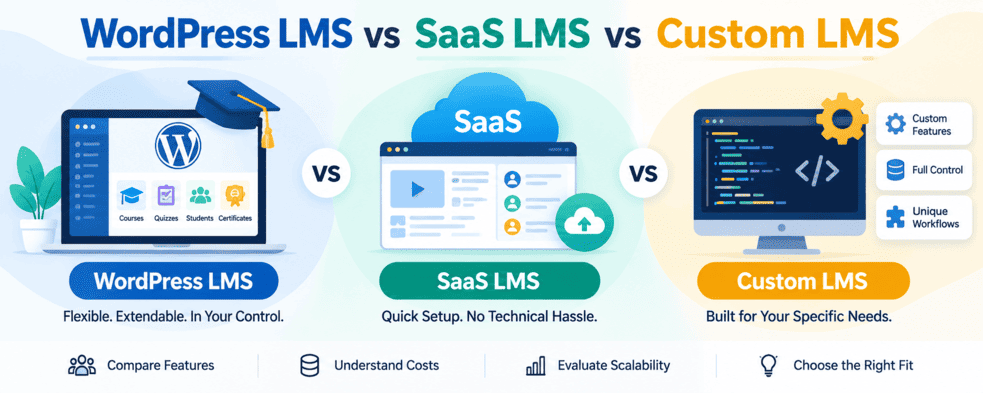
WordPress LMS vs SaaS LMS vs Custom LMS
There is no clear single answer as to which LMS is best, because choosing an LMS depends on various factors. So, a type that fulfils your requirement is only best for you, but at the same time it can’t be good for another person or organization.
What is a WordPress LMS?
WordPress LMS plugins are generally plugins designed to add eLearning features to a WordPress website. These are feature-rich, extendable plugins that help you to build your eLearning website without needing coding knowledge.
WordPress has several LMS plugins, both free and paid. Free plugins generally offer basic features, while their Pro versions add more advanced features and additional options. Depending on the plugin, you can create courses, lessons, quizzes, competitive exam mock tests, student accounts, certificates, subscriptions, and other parts of an online learning platform.
One of the main advantages of using a WordPress LMS is that you do not have to build the entire learning platform from scratch. You can install an LMS plugin on your existing WordPress website and configure it according to your requirements. Many plugins also support extensions and integrations, allowing you to add more features as your website grows. For example, Acadlix is a WordPress LMS plugin that combines course management with quizzes and exam-related features. It allows you to build an eLearning website on WordPress without developing the complete LMS from scratch, while still giving you the flexibility to customize the website according to your requirements.
WordPress is one of the most widely used content management systems (CMS) and powers more than 43% of websites globally. This large ecosystem also means that you can find a wide range of themes, plugins, hosting options, and developers to help build and maintain your eLearning website.
However, the features and flexibility you get depend on the LMS plugin you choose. Some plugins may be suitable for simple course websites, while others provide features for quizzes, exams, memberships, payments, live classes, student management, and more.
What is a Custom LMS?
LMS that you get built from scratch based on your requirements is considered a custom LMS. The complete development of these LMSs is carried out based on your exact requirements. You can decide how the system should work, which features it should include, and how the different parts of the LMS should be connected.
A custom LMS is useful when the standard features available in existing LMS platforms do not meet your needs. For example, you may need a specific course structure, custom student dashboard, unique exam system, special payment process, or integration with your existing software. These requirements can be included during development instead of changing your workflow to fit an existing LMS.
However, developing an LMS from scratch usually requires more time and a higher budget than using an existing LMS. You also need a development team to handle updates, security, bug fixes, server maintenance, and new features after the initial development. The development process can also take several months, depending on the size and complexity of the LMS.
For organizations with very specific requirements or a large number of users, a custom LMS can provide greater control over the platform and its future development.
What is a SaaS LMS?
Many companies also provide LMS platforms using the Software as a Service (SaaS) model. In this model, the LMS is hosted on the company’s own servers, so you do not need to manage the hosting or install the software yourself. You can simply create your account, set up your eLearning website, upload your course content, and add your students.
SaaS LMS platforms are generally easy to set up and can help you get your eLearning website or app running quickly. The company takes care of hosting, software updates, security, backups, and other technical requirements.
However, the pricing of SaaS LMS platforms can become expensive as your number of students and transactions increases. Many providers charge a recurring subscription fee and may also charge additional fees based on the number of students, courses, or transactions.
Another important factor is data ownership and control. Your course content, student information, payment data, and other learning-related data are stored on the provider’s servers. Some organizations and coaching institutes prefer more control over their data and infrastructure and may not want to depend entirely on a third-party platform.
SaaS LMS platforms can be a good option for businesses that want a quick setup and do not want to manage the technical side of running an LMS. However, organizations that need more control, customization, or predictable long-term costs may consider a self-hosted LMS instead.
Because Custom LMS solutions depend on your requirements and have no defined cost or timeline, we are comparing WordPress LMS with SaaS LMS.
WordPress LMS vs SaaS LMS
| Feature | WordPress LMS | SaaS LMS |
| Hosting | You host the LMS on your own hosting/server | Hosted by the SaaS provider |
| Setup | Requires WordPress and an LMS plugin | Usually ready to use after registration |
| Ease of setup | Easy, but requires some initial configuration | Very easy to get started |
| Customization | High — you can customize the website, LMS, and App | Usually limited to the options provided by the platform |
| Control | You have more control over your website and data | The provider manages the platform and infrastructure |
| Cost | Usually hosting + plugin cost | Usually monthly/yearly subscription and per transaction or usage fees |
| Scaling cost | Depends mainly on hosting and the plugins/services you use | Can increase as students, storage, or transactions increase |
| Data storage | Stored on your own hosting/server | Stored on the SaaS provider’s servers |
| Plugins & integrations | Large number of WordPress plugins and integrations available | Limited to supported integrations |
| Maintenance | You are responsible for updates, backups, security and hosting | Mostly managed by the SaaS provider |
| Ownership | Greater control over the website and its data | Depends on the provider’s terms and platform |
| Long-term flexibility | Can be extended and modified as your requirements change | Depends on the features and roadmap of the provider |
| Best suited for | Businesses that want control and customization | Businesses that want quick setup with minimal technical management |
Factors to Consider Before Choosing an LMS
Before choosing an LMS, consider your requirements and how you plan to use the platform in the future. Some important factors to look at are:
Features: Check whether the LMS provides the features you need for courses, quizzes, exams, payments, certificates, and student management.
Cost of ownership: Consider the initial cost as well as ongoing expenses such as hosting, subscriptions, transaction fees, and maintenance.
Customization: Check how easily you can customize the LMS according to your requirements.
Scalability: Make sure the LMS can handle an increasing number of students and courses as your business grows.
Data and Control: Understand where your data is stored and how much control you have over your website, content, and student data.
Integrations: Check whether it can connect with the other tools and services you already use.
Support and Maintenance: Consider how updates, security, backups, bug fixes, and technical support will be handled.
Which LMS Should You Choose?
The right LMS depends on your budget, requirements, and the level of control you need. A custom LMS is suitable when you need highly specific features and workflows. A WordPress LMS like Acadlix can be a flexible option if you want more control and customization without building everything from scratch. You can use WordPress as the base and add the LMS features you need for courses, quizzes, exams, payments, certificates, student management, and other eLearning requirements. This approach can be particularly useful for coaching institutes, educators, and training businesses that want to build their platform around their own requirements.
A SaaS LMS can be useful if your priority is a quick setup and you do not want to manage hosting and technical maintenance. Before choosing, consider your required features, number of students, budget, customization needs, and long-term plans.
Conclusion
Choosing an LMS depends on your requirements, budget, and how much control you need over your eLearning platform. A custom LMS offers the most flexibility but requires more time and development work. A WordPress LMS provides a good balance of flexibility, features, customization, and cost, while a SaaS LMS makes it easier to get started without managing the technical side.
For many educators, coaching institutes, and training businesses, a WordPress LMS such as Acadlix can provide a practical middle ground between building an LMS from scratch and depending completely on a hosted SaaS platform.
EXPLORE ACADLIX LMS