
These settings let you manage the Quiz category, templates, and subjects. You can add/edit/delete these from here.
Navigate to Acadlix -> Settings -> Quiz
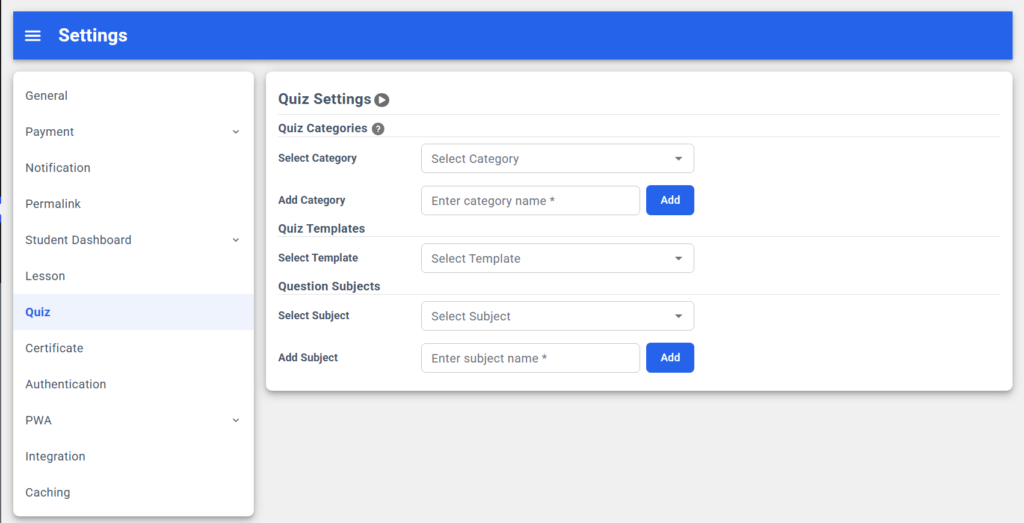
Quiz Categories
Quiz categories help you to manage & search your quizzes easily. You can add a category per quiz. This can also be added while creating or editing a quiz or from the quiz category settings.
How to add a new quiz category
- Simply enter the category name.
- Click the Add button
That’s it; a new Quiz category is added, and it will start appearing in the category list above.
How to edit/update a quiz category
- Select a quiz category from the list.
- Update its name
- Click the Update button.
That’s it; now your existing category is updated.
How to delete a quiz category
By following these simple steps, you can easily delete a category
- Select a quiz category from the list.
- Click the delete button
That’s it; your selected category has now been deleted.
Read more about Quiz category management.
Quiz Templates
Quiz templates help you avoid setting the same options again and again for the same type of quizzes. You can simply create quiz templates and then can use them later.
From here, you can simply rename or delete the templates.
How to rename/update a quiz template?
By following these simple steps, you can rename the quiz template easily.
- Select the desired quiz template
- Change the text or rename it
- Click the Update button
That’s it; now you have renamed the quiz template.
How to delete a quiz template?
By following these simple steps, you can delete the quiz template easily.
- Select the desired quiz template
- Click the delete button
That’s it; your selected quiz template has now been deleted.
Read more about Quiz Template settings.
Question Subjects
Question subjects help you to manage & search your questions easily inside a quiz or while copying from another quiz. You can add a subject/category per question. This can also be added while creating or editing a question, while setting the bulk subject option, or from the question subject settings.
How to add a new question subject
- Simply enter the subject name.
- Click the Add button
That’s it; a new question subject is added, and it will start appearing in the subject list above.
How to edit/update a question subject
- Select a question subject from the list.
- Update its name
- Click the Update button.
That’s it; now your existing subject is updated.
How to delete a question subject
By following these simple steps, you can easily delete a subject
- Select a question subject from the list.
- Click the delete button
That’s it; your selected category has now been deleted.